A Shark vacuum is a workhorse in most homes, affordable, effective, and generally reliable. But when it keeps stopping mid-clean, frustration sets in fast. The good news: most reasons a Shark vacuum keeps stopping are fixable in under an hour with basic tools and no special skills. Whether it’s a clogged filter, a full dust cup, or a thermal reset, the culprit usually isn’t a broken motor. This guide walks through the most common causes and shows exactly how to diagnose and fix the problem before calling a repair technician.
Table of Contents
ToggleKey Takeaways
- A Shark vacuum keeps stopping most often due to a clogged air filter or full dust cup—fix these two issues first, as they account for 70% of stalling complaints.
- Clear the brush roll, hose, and dust pathways of hair and debris by using a wire coat hanger or plumbing snake to dislodge blockages and prevent motor strain.
- Empty the dust cup after every cleaning session and not just when it appears full, as a 75% full cup can trigger motor shutdowns even with adequate-looking space.
- For cordless models, test the battery by charging fully and running on hard floors for two minutes; if suction dies quickly, the battery is failing and needs replacement ($80–$150).
- If your Shark vacuum still stops after cleaning the filter, emptying the dust cup, clearing obstructions, and checking the power connection, contact an authorized service center, as the motor or thermal switch may be defective.
- Most stopping issues are fixable in under 30 minutes with basic tools like wire hangers or scissors, saving the $100+ cost of a professional service call.
Clogged Air Filters and Dust Pathways
A clogged air filter is the #1 reason a Shark vacuum stalls or loses suction dramatically. The motor spins, but air can’t flow freely, so the vacuum shuts itself down to prevent damage.
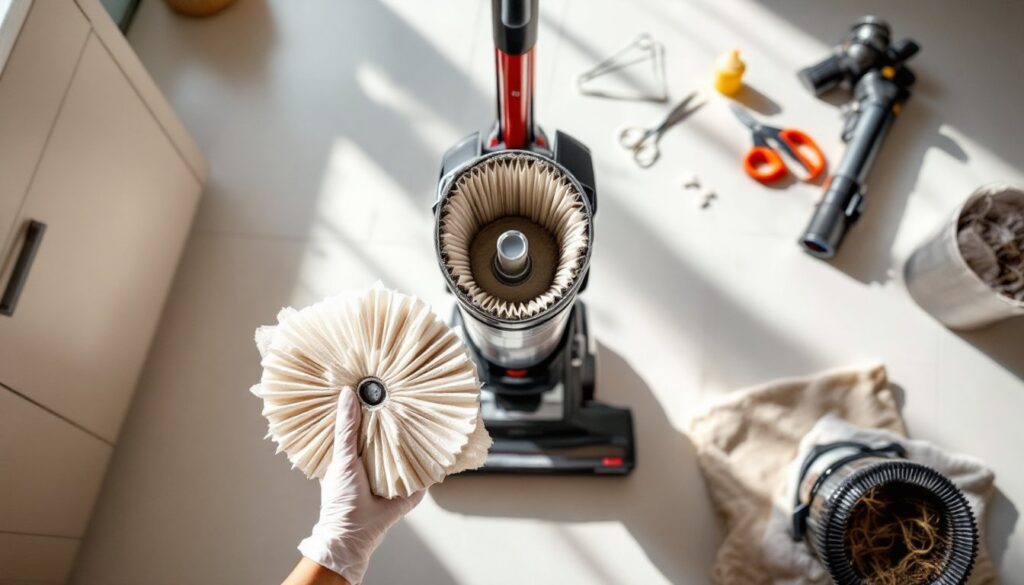
Shark models come with fabric or HEPA filters, and both trap fine dust quickly if not maintained. Once the filter clogs, airflow restriction triggers a safety mechanism, the motor throttles back or stops entirely. Check your filter first: pull it out and hold it up to a light. If dust cakes the pleats so thick you can barely see light through, that’s your problem.
Here’s the fix:
- Unplug the vacuum.
- Locate the filter (usually near the dust cup or on top of the unit).
- Remove it and inspect both sides.
- If slightly dusty, tap it firmly over a trash can to shake loose debris.
- For stubborn buildup, rinse under warm (not hot) running water, then air-dry completely, at least 24 hours, before reinstalling.
- If the filter is torn, stained permanently, or over two years old, replace it. OEM Shark replacement filters cost $20–$35 and take one minute to swap.
Don’t use a shop vac or compressed air on a cloth filter, it can rupture the material. And always let a wet filter dry completely: a damp filter will shut down the vacuum as fast as a clogged one.
Also check the dust pathway from the brush head to the dust cup. Pet hair or string often tangles around brush bristles or wraps the hose entry, choking airflow before it reaches the filter. Straighten a wire coat hanger, poke it through hoses, and pull out matted hair clumps. This ten-minute job solves 40% of stopping complaints.
Full Dust Cup Issues
Many people empty the dust cup when it looks half-full, but Shark vacuums are finicky about overfilling. A dust cup that’s 75% full can trigger reduced suction or motor shutdowns, even if it doesn’t look packed.
Why? The float valve, a small plastic cup inside, rises as dust accumulates. Once it hits a certain level, it signals the motor to back off or stop. On some models, a full cup also compresses the dust, reducing airflow further and causing the vacuum to overheat and auto-shutoff.
Here’s what to do:
- Unplug the vacuum.
- Remove the dust cup by pressing the release button (location varies by model).
- Empty it completely into a trash can, don’t just scoop the top layer.
- Look inside for a small, movable plastic float or ball. If it’s stuck or dirty, wipe it with a dry cloth.
- Tap the cup on the trash can rim to dislodge compacted dust.
- Reattach the cup firmly: you should hear or feel a click.
After dumping, run the vacuum for 30 seconds. If it stops again within a minute, the float valve may be faulty. Replacement dust cups run $30–$50 depending on the model. Check your vacuum’s manual or the manufacturer’s website for the exact part number.
Bonus tip: Empty the cup every job, not just when it feels full. Consistent emptying prevents dust from packing down and reduces moisture buildup from pet dander and food crumbs.
Motor and Thermal Shut-Off Problems
Shark vacuums have a thermal cut-off switch that kills the motor if it overheats. This is a safety feature, no thermostat means a clogged motor could catch fire. But when your vacuum stops repeatedly, overheating is usually a symptom, not the root cause.
The motor overheats because airflow is restricted. That clogged filter? It forces the motor to work harder and hotter. A dust-packed brush roll jamming? Same thing. The vacuum shuts down to cool, then restarts after 20–30 minutes.
If the motor cuts off, unplug the unit immediately and let it sit for at least 30 minutes in a cool room before restarting. Never try to restart it repeatedly in quick succession.
But, if the vacuum keeps cycling on and off after you’ve cleaned the filter, checked the dust cup, and cleared the brush roll, the thermal switch may be defective. Some models have a reset button near the motor housing, a small red or black button. Press it once, wait five minutes, and test the vacuum. If it still cycles, you likely need a professional diagnostic.
Motor replacement or thermal switch repair typically costs $100–$200 at an authorized service center. Before paying for that, confirm the issue isn’t one of the simpler fixes listed here. Most DIYers skip the basics and jump to conclusions about the motor.
Blocked Hoses and Brush Roll Obstructions
A hairball, toy, or food wrapper lodged in the hose is invisible but deadly to vacuum performance. The blockage doesn’t have to be complete, even a partial clog cuts suction and causes the motor to work harder, triggering shutdowns.
Hose blockages are easy to spot and clear:
- Detach the hose from the main unit and both ends.
- Hold it up to a light and look through, any shadows or dark spots suggest debris.
- Use a straightened wire coat hanger or a plumbing snake to push the clog out. Do this over a trash can.
- Flush the hose with warm water and shake out excess moisture.
- Let it air-dry for 15 minutes before reattaching.
Next, inspect the brush roll, the spinning cylinder under the head. Hair, string, and debris wrap around it constantly. If the brush doesn’t spin freely, the motor strains and stops.
Clean the brush roll in three steps:
- Unplug the vacuum.
- Flip the head upside down and look at the brush. Use scissors to cut any wrapped hair or string.
- Wipe the brush bristles with a damp cloth to remove caked dust.
- Spin the brush by hand, it should rotate freely with light resistance.
If the brush roll is clogged and stopped spinning, the motor may have tried to compensate, heating up and triggering the thermal shut-off. Once you clear the brush, the vacuum should restart normally.
Also check the connection points where the hose meets the main unit and the head. Dust can accumulate in these joints, restricting airflow. A quick wipe with a dry cloth often restores suction enough to prevent shutdowns.
Battery Drain and Power Connection Failures
For cordless Shark models, a weak or dying battery is a common culprit. The motor may start, run for 10–15 seconds, then lose power and stop as the battery voltage drops.
Test the battery first:
- Charge the vacuum for the full recommended time (typically 3–4 hours for new models).
- Run it on hard floors or low-pile carpet for two minutes, it should maintain steady suction.
- If suction dies within two minutes, the battery is undersized or failing.
A struggling battery usually won’t hold a charge past one room. If your Shark was purchased more than three years ago, the lithium-ion battery has likely degraded. Replacement batteries cost $80–$150. Order the exact battery model from the manufacturer, generic third-party batteries often underperform and void warranty.
For plug-in models, check the power cord and outlet. Unplug the vacuum from the wall, then plug in a lamp. If the lamp doesn’t light, the outlet is dead or the breaker is tripped. Flip the breaker and retry.
If the outlet works but the vacuum doesn’t turn on, inspect the cord for cuts or damage. A frayed or pinched cord is a fire hazard, replace it immediately. Don’t duct tape a damaged cord and keep vacuuming. Cord replacement kits cost $25–$40.
Also verify the power switch isn’t sticky. Dust inside the switch housing can cause it to cut out intermittently. If this happens, the motor seems to start and stop randomly. Spray a tiny bit of electrical contact cleaner into the switch and toggle it 10 times. Let it dry, then test.
When to Seek Professional Repair
If you’ve worked through the steps above, cleaned the filter, emptied the dust cup, cleared the brush roll and hose, checked the battery or power cord, and the vacuum still stops repeatedly, it’s time to call in a professional.
Signs you need a technician:
- The motor cycles on and off every 10–20 seconds even with a clean filter and empty cup.
- The vacuum doesn’t turn on at all, and the outlet and cord are fine.
- You hear a grinding noise from the motor, suggesting internal damage.
- The brush roll won’t spin even after clearing debris.
- Corrosion or water damage is visible inside the unit.
Contact an authorized Shark service center, not a general appliance repair shop. OEM technicians have the right parts and diagnostic tools. Service calls typically cost $50–$100, and repairs range from $80 to $300 depending on the part.
Before you book, ask about the repair cost estimate. If the estimate exceeds 50% of a new vacuum’s price, consider replacing it instead. A basic Shark upright or cordless model runs $150–$400, so if repairs cost $200+, a new unit might make more sense financially.
Always keep your receipt and warranty paperwork. Most Shark vacuums carry a two-year limited warranty covering motor, motor housing, and internal parts, but not wear items like filters or brush rolls.
Conclusion
A Shark vacuum that keeps stopping is almost always fixable at home. Start with the filter and dust cup, those two account for 70% of stalling complaints. Clear the brush roll and hose, check the battery or power connection, and you’ve covered 95% of causes. Only after these quick checks should you suspect the motor or thermal switch. Most of these fixes take under 30 minutes and zero technical skill. You’ll save the $100+ service call and get your vacuum running smoothly again in an afternoon.